Google wants 12 testers for 14 days. We bring them.
If you publish under a personal developer account, Play will not let your app go live until 12 testers have opted in and kept using it for 14 days straight. We match you with real testers on real devices, and show you day by day who actually opened it.
Here to earn instead? Test apps and get paid →
Real testers. Real proof.
Two halves of one job: get real testers onto your app, and keep a record that shows they were really there.
Verified testers
Real people on real devices, matched to your run and shown to you as T-01, T-02, and so on.
- One account, one device, verified once.
- You never see who they are. They never see who you are.
- A check-in for every day of the run.
The engagement grid
A day-by-day grid of every tester on your run, showing how long they actually had your app open.
- Daily foreground time for each tester.
- The device brand, model and Android version behind every row.
- A verified engagement summary when the run closes.
Three steps from upload to proof.
Create a gig
Add your closed-track release and opt-in link, pick a plan, and pay for the run.
Verified testers run it
We match real testers on real devices. They install your app and use it every day of the fourteen-day window.
Ship with proof
Follow the grid as each day is verified, then get the engagement summary when the run closes.
One run, one price.
Pay for the run, in KES or USD. Nothing recurring.
- Testers
- 12
- Starts within
- 48 hours
- Guarantee
- No guarantee
- Companion-app verification
- Daily engagement grid
- Completion summary
- Testers
- 15
- Starts within
- 12 hours
- Guarantee
- Free re-test
- Everything in Community, plus
- Automatic tester replacement
- Mixed device brands
- Testers
- 20
- Starts within
- 6 hours
- Guarantee
- Free re-test, then a refund
- Everything in Launch, plus
- SDK verification, not just the companion app
- At least 3 device brands
- Testers
- 25
- Starts within
- 3 hours
- Guarantee
- Free re-test, then a refund
- Everything in Pro, plus
- At least 5 device brands
- Priority start
Get paid to test real apps.
Developers need twelve people to use their app for fourteen days straight before Google will let it go live. You are one of those people. Install the app, open it every day of the run, and get paid when the gig completes.
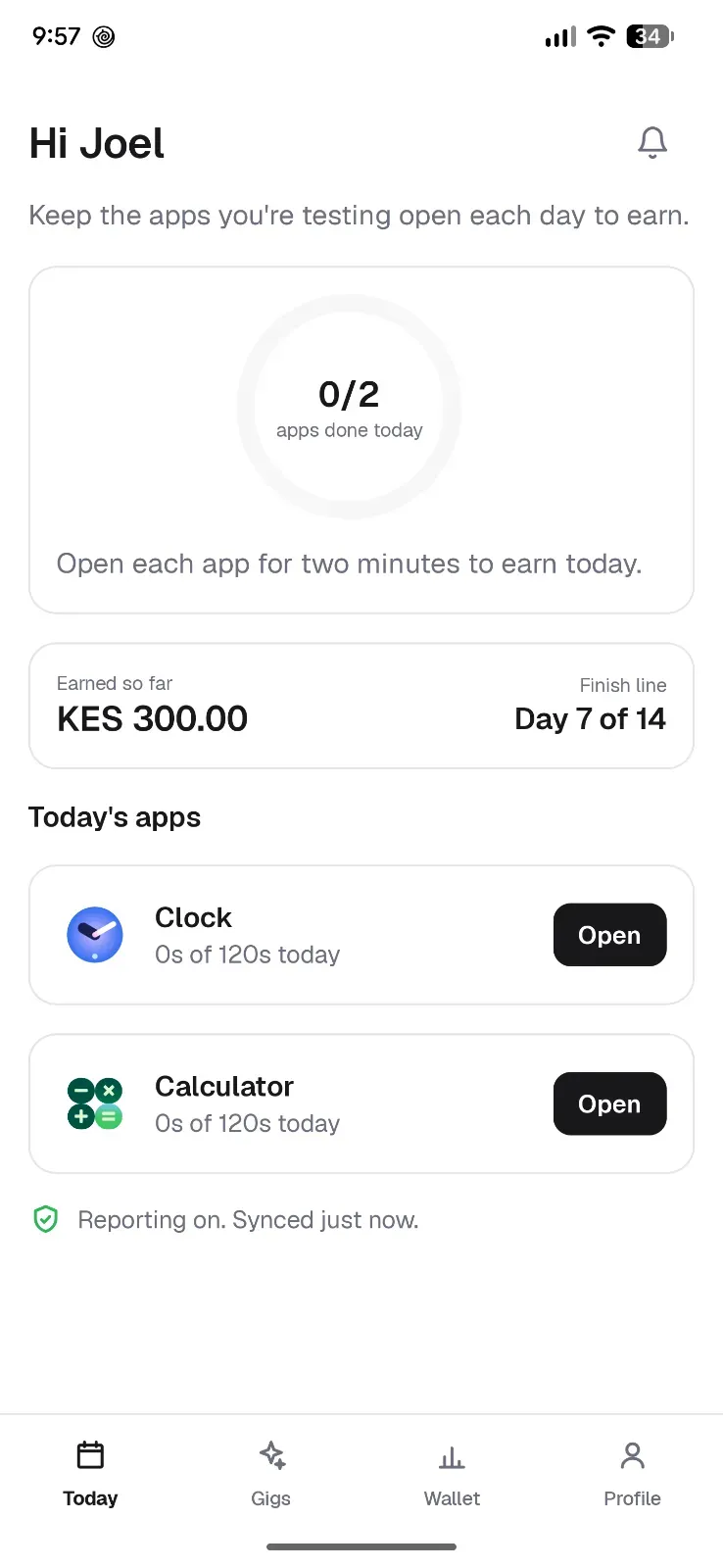
Get the app
Install the Android app and grant usage access. That permission is how your testing days are verified, and nothing else is read from your phone.
Verify once
Confirm your phone number, your Google Play email and your ID. The ID is checked and discarded, never stored and never shown to a developer.
Join a gig
Browse the gigs you are eligible for and opt in. You accept the app on Google Play, then open it each day of the run.
Get paid
Each verified day adds to your balance, and it pays out to your mobile money number when the gig completes.
TesterGig for Android
com.testergig.companion
- Version
- 0.1.3
- Size
- 5.4 MB
- Requires
- Android 8.0+
- Updated
- September 2026
- 1Download it. Your browser will warn you about this kind of file and ask whether to keep it. Keep it. The warning is about the file type, not this app.
- 2Allow your browser to install apps. Open the file. Android says your phone is not allowed to install unknown apps from this source and offers a Settings button. Tap it, turn on Allow from this source, then come back and tap Install. You do this once, for your browser, not for every app.
- 3Turn on usage access. The app asks for it on first run and opens the right screen for you. This is what verifies your testing days, and it is the only permission that matters.
- 4Sign in and join a gig. Your phone number, a one-time verification, and you are testing.
If the usage access switch will not turn on and says access was denied, Android is holding it back because the app came from outside the Play Store. Go to Settings, Apps, TesterGig, tap the menu in the top right, choose Allow restricted settings, then turn the switch on. Nothing on the usage access screen tells you this, which is why it is here.
This is the signed build from our own release, served from our own domain. Android may warn you about installing outside the Play Store: that warning is about where the file came from, not about the app.
What you need
- An Android phone on 8.0 or newer
- A Google account you can accept a Play test with
- A national ID for one-time verification
- A mobile money number in your own name
How the money works
Every verified day earns, and the balance pays out when the gig completes. A useful bug report earns a bounty on top, and a clean streak moves you up a tier, which raises your day rate on later gigs. Balance, ledger and payout history all live in the app.
Questions testers ask
What do I actually have to do each day?
Open the app you are testing and use it properly. The run lasts fourteen days and the days must be consecutive, so a missed day is the one thing that costs you.
Does installing this app join me to a test?
No, and the difference matters. This app is how you find runs, join them and get paid. Joining a particular run sends you to Google Play to accept that developer's test, and only accepting there counts towards what Google requires of them.
Will the developer see who I am?
No. Developers see anonymous labels like T-01 and whether each day was verified. Your name, number and ID are never shown to them.
When does the money arrive?
When the gig completes. You can watch the balance build up day by day in the app, and your payout history is there too.
Do I have to review or rate the app?
Never. We do not ask for ratings or reviews, and any offer to pay for one would breach Google Play policy. You are paid for testing, not for opinions.
Why is the app not on the Play Store?
It will be. Until it is listed you install it straight from us, which is why the download above is the signed build from our own release.
Android is warning me about installing it. Is that normal?
Yes, and it says nothing about this app. Android shows that warning for anything installed outside the Play Store, so it would show it for any app in our position. The steps above walk through it, and the build is signed by Google Play, which you can see on the card.
Two ways in. Pick yours.
I have an app to ship
Plan a run in minutes. Real verified testers, the full fourteen days, and a summary at the end.
I want to get paid to test
Install the app, open it each day of a run, and get paid when the gig completes. Verification takes one sitting.